Unity Event Coroutines: The "Double Update" Trap
Exploring the quirky execution order of Unity event function coroutines, including a look at why changing Start()'s return type can cause an unexpected double update.
Event Function Coroutines
The other day I discovered that some Unity event functions can be defined as a coroutine by simply setting their return type to IEnumerator.
Unity will automatically run them as a coroutine when executed!
Isn’t that neat?
Source
Example
1
2
3
4
5
6
7
8
9
private IEnumerator Start()
{
    yield return Task();
}

private IEnumerator Task()
{
    yield return new WaitForSeconds(10f);
}
The Weirdness
Coroutine event functions can be pretty handy if you want full control over the flow of the script but they can lead to some unexpected behaviour if you’re not paying attention.
Let’s have a look at Unity’s execution order:
StartUpdateCoroutine
Notice the Start method runs before Update and coroutines are run after.
.. I smell a potential weirdness.
Lets have a look at this example I put together:
1
2
3
4
5
6
7
8
9
10
11
12
13
14
15
16
17
18
19
20
21
22
23
24
25
26
27
28
29
30
31
32
public class StartCoroutineOrder : MonoBehaviour
{
    private bool _isStart;

    private IEnumerator Start()
    {
        while(true)
        {
            if(_isStart)
            {
                Debug.LogWarning("Double Start");
            }

            Debug.Log("Start loop");

            _isStart = true;
            yield return null;
        }
    }

    private void Update()
    {
        if(!_isStart)
        {
            Debug.LogWarning("Double Update");
        }

        Debug.Log("Update loop");

        _isStart = false;
    }
}
The idea behind this script is to watch for any change in the execution order of two loops:
The while loop in Start and the bog standard Update loop.
We use _isStart to track if the last loop executed was in the Start method.
If _isStart is true in while executing the Start method, we log a warning.
If _isStart is false in while executing the Update method, we log a warning.
(The only alternative being the previous loop was the Update loop.)
So stepping through the first few frames of this script we’ll get:
| Frames | Call Order | Log Output |
|---|---|---|
| Frame 1 | Start → Update | Start loop → Update loop |
| Frame 2 | Update → Start Coroutine | Double Update → Start loop |
| Frame 3 | Update → Start Coroutine | Update loop → Start loop |
Notice that double update we get between the first and second frame?
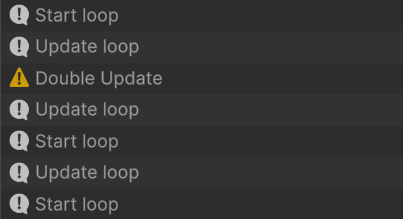 In the first frame the
 Start contents will run before Update as expected.
After the second frame Update will always execute before the Start coroutine.
This usually won’t cause any trouble, but it’s handy to be aware of this if you’re working with event function coroutines.
When it causes trouble
Let’s look at a situation where this would be a problem.
1
2
3
4
5
6
7
8
9
10
11
12
13
14
15
16
17
18
19
20
21
22
23
24
25
26
27
28
public class StartCoroutineError : MonoBehaviour
{
    private int _creationFrame;
    private int _currentFramesAlive;

    private IEnumerator Start()
    {
        // 1. Captured on Frame 1
        _creationFrame = Time.frameCount;
        Debug.Log($"[Start] Initialized on Frame: {_creationFrame}");

        // 2. Yield until the next frame loop evaluation
        // > Update is run twice in this period
        yield return null;

        // 3. Resuming after the yield
        int framesPassed = Time.frameCount - _creationFrame;

        Debug.Log($"[Start Coroutine] Woke up on Frame: {Time.frameCount}");
        Debug.Log($"[Start Coroutine] Calculations say {framesPassed} frames have passed.");
        Debug.Log($"[Start Coroutine] Script internal counter says {_currentFramesAlive} updates have run.");
    }

    private void Update()
    {
        _currentFramesAlive++;
    }
}
Output:
[Start] Initialized on Frame: 1
[Start Coroutine] Woke up on Frame: 2
[Start Coroutine] Calculations say 1 frames have passed.
[Start Coroutine] Script internal counter says 2 updates have run.
Looking at the numbers, you would think that advancing exactly 1 frame (Time.frameCount moving from 1 to 2) means exactly 1 Update loop should have executed in the middle.
Instead, our counter shows Update ran twice before the rest of our Start method could finish its very first yield. 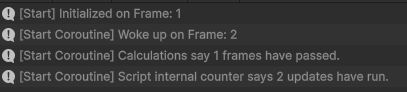
While this is a somewhat silly example, it shows this timing gap could cause some confusion in more complex systems.
Conclusion
Event functions as coroutines can be super useful, but it’s important to careful and understand their timing.
Thanks for reading my first actual blog post!
Lets see if I can improve my writing and the readability of the content.